Creating your Profile
Activity 1: Edit your profile
Your first task is to edit your course profile. Add your location and a paragraph sharing what you do and what your connection is to the course. Please add a picture.
The easiest way to get to your profile is by clicking anywhere you see your full name, e.g. at the top right of any course page. Need more help?Follow the step-by-step instructions below.
From the right hand navigation column, under Settings, click My Profile Settings. A drop down menu opens to where you see Edit Profile.
click on Edit Profile
scroll down all the menu items. Lower down the page you can add your interests, and below that, upload a picture.
1. Go to the top right hand navigation menu(where you see your name), scroll down the list of menu items and click on Edit Profile.
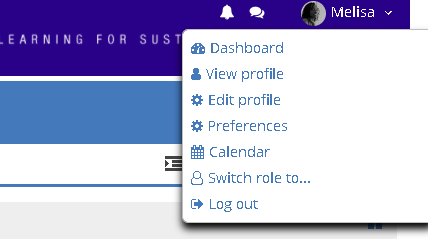
click on Edit Profile
scroll down all the menu items. Lower down the page you can add your interests, and below that, upload a picture.
2. You will find out that there are five sections:
- General
- User Picture
- Additional names
- Interests
- Optional
General section: The general section has your personal details, your name, email address, location and description. You need to edit or update any incorrect information. Scroll down to the description section and write something about yourself. This part is important for other participants to know more about you so please make sure you write in detail about who you are, what you do and why you are on this course.
User Picture: Add a picture to your profile. There are two ways to upload your picture:
You can drag and drop your picture in the space provided, or
Under new picture, then click on Add new file icon and upload an image from your computer.
Additional names: Please use the space add additional names if any.
Interests: Please use the space provided to share with us your interests
Optional: This section is optional but helpful. You can share additional contact information including your mobile and social networks. This will make it easier for other participants to network with you on other platforms.
Congratulations! You now have a complete profile on the Teacher Futures moodle site!